
Talk to an expert
Portal
Talk to an expert
  • Home
  • Products
    • Logic+ Software
    • SMART Technology
  • About
  • Contact
  • Home
  • Products
    • Logic+ Software
    • SMART Technology
  • About
  • Contact

How can we help you?

Overview

7
  • Settings
  • Analytics
  • Delay Analysis
  • Logic+ Toolbar
  • Gantt
  • List of Schedules
  • Schedule Viewer

Project Setup

5
  • Logic+ Schedule Analysis Tool
  • Schedule Files
  • Select Baseline
  • Name Your Project
  • Project Setup Wizard

Schedule Viewer

7
  • Delay Analysis
  • Activity Details
  • Activity History
  • File History
  • Project Schedule Files
  • Enterprise Project List
  • Using Logic+ to Import and Analyze Schedule Files

Gantt

8
  • Gantt Labels
  • Columns
  • Zoom
  • Sort
  • Date
  • Group
  • View
  • Gantt View

Traceback

9
  • Traceback Settings
  • Delay Analysis Menu Options
  • Candidate Score Categories and Descriptions
  • Additional Traceback Options
  • Analyse different activity
  • Generate alternate critical path
  • Critical Path Candidates
  • Traceback Analysis
  • Running a Traceback

Delay Analysis

2
  • Delay Charts
  • Delay Analysis Menu Options

Analytics

3
  • Analytics Reports
  • ChartViewer Options
  • Accessing the Analytics Menu

Settings

2
  • Traceback settings
  • Navigation

License Information

4
  • Connect with Logic+
  • Activate Logic+ Licence
  • Purchase Logic+ License
  • Licence Key Details
  • Home
  • Docs
  • Traceback
  • Traceback Analysis
View Categories

Traceback Analysis

< 1 min read

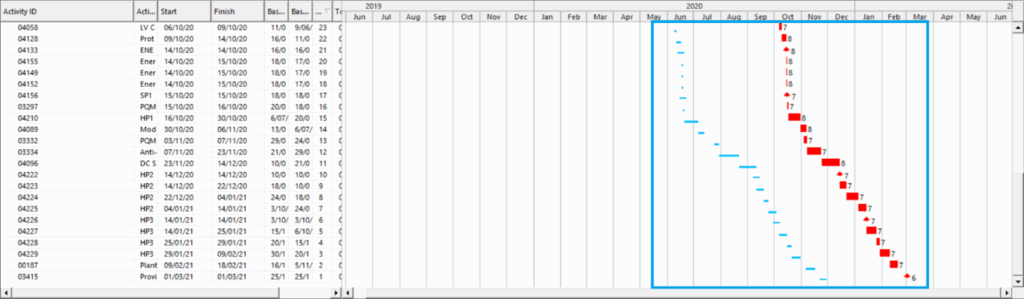
After running a traceback, the Gantt view displays the baseline and critical path activities from the schedule file.

Interacting with the Gantt view and the tabs on bottom tool bar will allow you to analyse activity details, see how the critical path was determined, generate alternate critical paths and review delay reports.

Traceback Gantt View

After running a traceback, the baseline (light blue line) and critical path activities (red activities) are shown in the Gantt view.

Logic+ traceback is used to determine the critical path based on the calculated candidate score of all schedule files selected to be included.

Still stuck? How can we help?

How can we help?

Updated on April 28, 2025

Head Office

Level 7, 303 Coronation Drive
Milton QLD 4064 Australia

Home     |     Logic+ Software     |     Privacy Policy     |     Terms & Conditions     |     Documentation

© 2025 LWARE Pty Ltd  |  Digital Marketing by Focused Marketing

  • Follow