
Talk to an expert
Portal
Talk to an expert
  • Home
  • Products
    • Logic+ Software
    • SMART Technology
  • About
  • Contact
  • Home
  • Products
    • Logic+ Software
    • SMART Technology
  • About
  • Contact

How can we help you?

Overview

7
  • Settings
  • Analytics
  • Delay Analysis
  • Logic+ Toolbar
  • Gantt
  • List of Schedules
  • Schedule Viewer

Project Setup

5
  • Logic+ Schedule Analysis Tool
  • Schedule Files
  • Select Baseline
  • Name Your Project
  • Project Setup Wizard

Schedule Viewer

7
  • Delay Analysis
  • Activity Details
  • Activity History
  • File History
  • Project Schedule Files
  • Enterprise Project List
  • Using Logic+ to Import and Analyze Schedule Files

Gantt

8
  • Gantt Labels
  • Columns
  • Zoom
  • Sort
  • Date
  • Group
  • View
  • Gantt View

Traceback

9
  • Traceback Settings
  • Delay Analysis Menu Options
  • Candidate Score Categories and Descriptions
  • Additional Traceback Options
  • Analyse different activity
  • Generate alternate critical path
  • Critical Path Candidates
  • Traceback Analysis
  • Running a Traceback

Delay Analysis

2
  • Delay Charts
  • Delay Analysis Menu Options

Analytics

3
  • Analytics Reports
  • ChartViewer Options
  • Accessing the Analytics Menu

Settings

2
  • Traceback settings
  • Navigation

License Information

4
  • Connect with Logic+
  • Activate Logic+ Licence
  • Purchase Logic+ License
  • Licence Key Details
  • Home
  • Docs
  • Overview
  • Logic+ Toolbar
View Categories

Logic+ Toolbar

< 1 min read

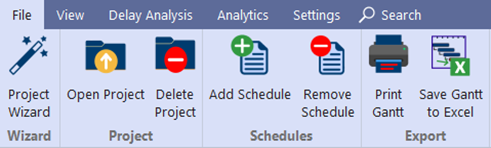
The toolbar provides easy access to key functionalities:

File Options #

  • Wizard: Upload project schedules, select a baseline file, and associate other schedule files.
  • Project:
    Open previously uploaded projects.
    Delete existing projects.
  • Schedules: Add or remove schedules.
  • Export: Print the Gantt Chart or save it to Excel.
View Options
#

  • Group: WBS, Date, None, Expand, Collapse.
  • Sort: Start & Finish.
  • Zoom: Zoom In, Zoom Out, or Zoom to Fit.
  • Columns: Customize columns with the “Best Fit” option.
  • Gantt Labels: Change labels (e.g., Activity ID) via the drop-down menu.

Still stuck? How can we help?

How can we help?

Updated on April 28, 2025
Table of Contents
  • File Options
  • View Options

Head Office

Level 7, 303 Coronation Drive
Milton QLD 4064 Australia

Home     |     Logic+ Software     |     Privacy Policy     |     Terms & Conditions     |     Documentation

© 2025 LWARE Pty Ltd  |  Digital Marketing by Focused Marketing

  • Follow